
How Hipe Works
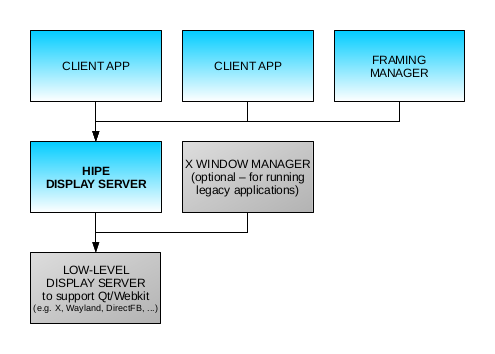
There are two sides to a Hipe session. On the server side is the Hipe display server (hiped), a single process that serves every Hipe application in the session.
On the client side are applications such as file managers, text editors, media players and calculators. They are called clients because they use the services of the display server. hiped gives each client its own frame, and a client can display content only within its own frame. Any number of clients can share one display server.
A framing manager is a client whose job is to arrange other clients' frames on the screen, much as a window manager does in other systems. It is an ordinary Hipe application, so it can look and behave however its author likes. Framing managers can be nested: a suite of related applications can be given its own environment, or untrusted applications can be kept together in a sandbox of their own.
Clients communicate with hiped by exchanging instructions over a local socket. For example, a client sends an instruction to change the contents of a tag, and receives an event instruction when the user clicks it.
Connecting to hiped
To connect, a client needs two things: the location of hiped's socket, which by default is in the user's runtime directory, and a host key, a string that proves the client is allowed a frame at a particular place.
A framing manager obtains a key for each frame it creates and hands it to the application it hosts there, typically through the HIPE_HOSTKEY environment variable when it launches it. For top-level frames, hiped keeps a key-file, which it rewrites with a fresh key every time one is used. The client library looks in both places by default.
Keys can't be reused, and access to the key-file can be restricted. A system can therefore place the key-file where only its own framing manager can read it, so that the framing manager holds the only top-level frame and every other application runs inside it.
Implementation stack
The Hipe display server is a Qt application built on hipecore, a display engine derived from WebKit. Hipe applications only ever talk to hiped; they don't use X11, Wayland or any other display system themselves. hiped draws through Qt, so it runs wherever Qt does: in an X11 or Wayland session, or directly on the graphics hardware through EGLFS (a build option of hipecore).
You can think of Hipe as a 'high level' display server. It does rendering, layout and frame management, and leaves hardware, input devices and drivers to the platform beneath it.
There are two ways to run Hipe:
- Within an existing desktop environment. Start hiped in your usual desktop session. Each top-level Hipe application appears as an ordinary window, managed by that desktop's window manager (or compositor) alongside your other applications.
- As the entire desktop. Start hiped --fill on a bare X session with no window manager, or on EGLFS. A top-level application then fills the screen and takes on the role of managing the whole desktop environment, usually as a framing manager hosting other applications. The screen is a blank canvas: a complete desktop environment of your own design, or the interface of an embedded device, built entirely from Hipe instructions.
See Running hiped for the options.